Team Fortress 2 Store
Aimbot, silent aim, player and class ESP, and radar for Team Fortress 2 on Windows PC. Monthly is $35. Lifetime is $150. Confirm Valve Anti-Cheat (VAC) status, then checkout.

tf2 cheats
Clear · Monthly $35 · Lifetime $150
Instant delivery · Check Valve Anti-Cheat (VAC) status first
Included features
Aimbot Options
Aimbot
Master aim lock for Team Fortress 2. Point at a target and the crosshair tracks the selected bone.
Aim Assist
Softer pull toward the target so the shot still feels like your own mouse movement.
Silent Aim
Adjust shot angle without visibly snapping the view, useful on Scout, Soldier, and Sniper.
Triggerbot
Fire when an enemy hits the crosshair — built for Heavy tracking and Spy backstabs.
Visual Options
ESP
Master switch for the overlay. Leave unused ESP types off to keep the HUD clean.
Player ESP
Mark RED and BLU players through walls, smoke, and payload carts.
Box ESP
Draw a box around each player so you can read stance at a glance.
Skeleton ESP
Draw a skeleton so you can see facing, crouch, and rocket-jump pose.
Health ESP
Show remaining health — useful before a Medic pop or Heavy push.
Name ESP
Show player names on the overlay when the build supports it.
Distance ESP
Show how far the target is, in Hammer units converted for the overlay.
Class ESP
Label Scout, Soldier, Pyro, Demoman, Heavy, Engineer, Medic, Sniper, and Spy.
Team Check
Filter overlay and aim by team so your own color is not treated as a target.
Enemy Only ESP
Hide teammates and show only the other team on 2fort, Dustbowl, and payload.
Item ESP
Mark dropped weapons, intel, and other world items on the map.
Pickup ESP
Highlight health kits, ammo packs, and other pickups before you rotate.
Radar Options
Radar
Master switch for the radar overlay.
2D Radar
Top-down plot of players around you — built for chokes like Granary and Badwater.
3D Radar
In-world markers that sit on the map so you can read height on upward maps.
Valve Anti-Cheat (VAC)
Built for Team Fortress 2 on Windows PC. After a client or Valve Anti-Cheat (VAC) patch, status may show Updating until tested — tf2 cheats publishes live status so you are not buying a dead loader. Status first, load second.
Checkout and delivery
- Confirm current status on tf2cheat.com.
- Only load when status is clear (or accept Updating risk).
- Checkout for digital license delivery worldwide.
- Follow the complete TF2 guide after delivery.
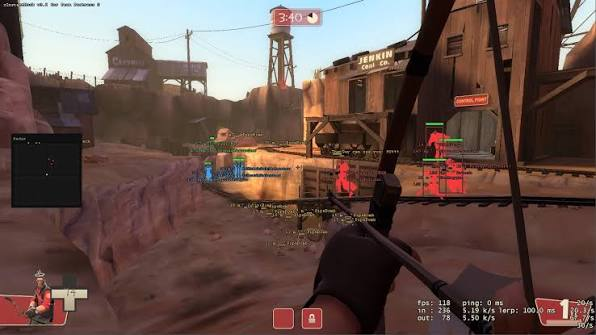
Feature preview
Preview of aimbot, ESP, and radar options for Team Fortress 2 on PC.

Team Fortress 2 store FAQ
Status, features, plans, delivery, and load questions before checkout.
How much do tf2 cheats cost?
Monthly access is $35 for 30 days. Lifetime access is $150. Confirm the live VAC status on tf2cheat.com before checkout.
What is tf2 anti cheat, and how does VAC status work here?
tf2 anti cheat is Valve Anti-Cheat (VAC), the Steam system that runs with Team Fortress 2. On this site, status is a point-in-time label. If it says Updating, wait. Load only when status is clear.
What visuals are included?
Visual options cover ESP, player ESP, box ESP, skeleton ESP, health ESP, name ESP, distance ESP, class ESP, team check, enemy only ESP, item ESP, and pickup ESP.
What does the radar show?
Radar includes a master switch plus 2D radar for a top-down plot and 3D radar for in-world markers so you can read height on maps like Upward and Badwater.
How do I buy tf2 cheats?
Start on the homepage, confirm VAC status, and review monthly at $35 or lifetime at $150. Open the store page for the feature list, then continue to checkout for digital delivery.
Where do I get support?
Use the Get Support button on the Support page. It opens the Discord server. Include your order ID and whether you need load, menu, or delivery help.