Aimbot · 10 min read · 2026-09-25
How a TF2 Aimbot Guarantees Perfect Accuracy on Every Class
Learn how TF2 target selection, smoothing, hitboxes, and projectile prediction change across all nine classes.
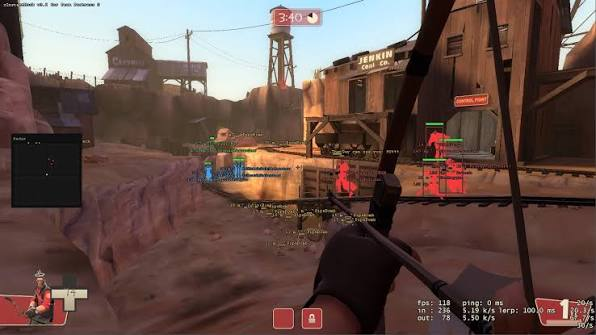
How an aimbot for TF2 handles accuracy
An aimbot for TF2 improves target selection and tracking, but no setting can literally guarantee every shot. Latency, weapon spread, projectile travel, map cover, and sudden movement still affect the result.
The useful goal is repeatable accuracy. A well-tuned menu selects a valid enemy, chooses the right hitbox, and applies the correct tracking method for the equipped weapon.
A Team Fortress 2 aimbot must handle nine classes with very different weapons. That is why class profiles matter more than one aggressive universal setup.
Hitscan versus projectile aiming
Hitscan weapons register against the point under the crosshair when the shot is processed. Projectile weapons create a moving object that needs time to reach the target.
Hitscan tracking
Scout scatterguns, Heavy miniguns, Engineer shotguns, and most Sniper rifles use hitscan logic. Direct bone selection, a controlled field of view, and smooth tracking work well for these weapons.
Torso priority gives stable tracking for rapid-fire weapons. Head priority fits weapons that reward headshots, but it can lose consistency when a target crouches or changes direction.
Projectile prediction
Soldier rockets, Demoman grenades, Huntsman arrows, and some Medic weapons need lead calculations. Prediction estimates where the target will be when the projectile arrives.
Projectile speed and gravity differ between weapons. A direct-hit rocket, stock rocket, grenade, and arrow cannot share one prediction value.
Core aimbot settings explained
Aimbot Team Fortress 2 menus usually expose field of view, smoothing, target priority, hitbox, visibility checks, and team filters. These controls decide how the lock behaves.
Field of view and smoothing
Field of view limits how far from the crosshair a target can be selected. A narrow value reduces large snaps, while a wider value finds targets faster during close fights.
Smoothing spreads the movement over time. Higher smoothing feels softer but may trail fast Scouts. Lower smoothing reacts quickly but creates sharper movement.
Target and hitbox priority
Crosshair distance is predictable for normal fights. Physical distance can help with nearby threats, while health priority can finish damaged players.
Use torso targeting for general consistency and head targeting for weapons with a real headshot benefit. Visibility checks should stop the lock from holding players behind solid cover.
Settings for all nine classes
Scout benefits from a narrow field and responsive torso tracking. Soldier needs rocket prediction and space for splash placement instead of a rigid bone lock.
Pyro uses close-range tracking for the flamethrower and prediction for flare guns. Demoman needs separate grenade and sticky timing because their paths and use cases differ.
Heavy works well with smooth torso tracking. Engineer mainly needs shotgun tracking, while Medic gains more from crossbow prediction and clear target information.
Sniper needs precise hitbox selection and a scope check. Spy can use torso tracking for the revolver or head priority for the Ambassador when the shot conditions allow it.
Build a controlled profile
Start with team check, visibility checks, a narrow field of view, and moderate smoothing. Test one familiar class before creating copies for other weapon groups.
Pair aim settings with readable visual information from the TF2 ESP guide. Class and health labels help you choose a target before aim selection begins.
The full feature set, current VAC status, and plan options are listed with tf2 cheats for players comparing the complete setup.
Common accuracy problems
If the lock trails targets, reduce smoothing or check network delay. If it jumps between enemies, narrow the field of view or change the target priority.
If rockets miss moving players, confirm the correct weapon profile and prediction values. Prediction cannot account perfectly for a player who changes direction after the projectile leaves.
If friendly players are selected, enable team check and enemy-only targeting. Use the same filters in ESP and the TF2 radar guide so every feature agrees.
Ready for tf2 cheats?
Check live VAC status, then buy aimbot, ESP, and radar for Team Fortress 2 on tf2cheat.com. Need help? Read support or player reviews. Own the game via the official site.
Community replies
Discussion prompts based on common player questions.
rocketlane
Soldier · 2026-09-25
The title is stronger than the real result, so the projectile limitation is important. Prediction helps, but air-strafes still change the shot.
meatshot
Scout · 2026-09-25
A narrow field and lower smoothing worked better than copying a Sniper profile. Scout needs quick tracking without jumping across the screen.
scopehold
Sniper · 2026-09-25
Separate scoped and unscoped settings made head priority much easier to control.
Frequently asked questions
Can a TF2 aimbot guarantee every shot?
No. It can improve target selection and tracking, but latency, spread, projectile travel, cover, and sudden movement still affect accuracy.
Which hitbox is best for TF2?
Torso targeting is stable for most rapid-fire weapons. Head targeting is useful for Sniper and specific weapons that reward headshots.
Why do rockets need different settings?
Rockets travel through the map instead of registering instantly. The menu must estimate target movement using projectile speed and travel time.
Should every class use the same profile?
No. Save separate profiles for hitscan, projectile, support, and precision weapons so each group gets suitable tracking and prediction.